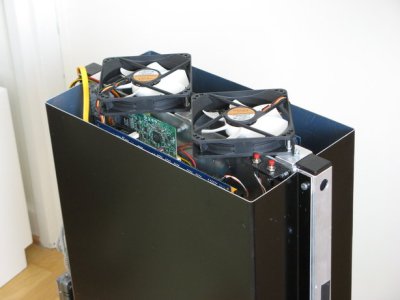
Did you hear that? Of course not, it is my cluster.
This project was originally started as a quest for a small and
silent HTPC (Home Theater Personal Computer). We have constructed and
built several of these boxes. The latest and best design can be seen further down the page in Figure One.
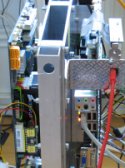
These HTPC systems are cooled passively in the sense that no fans are involved in the cooling of the CPU. The technique used for the cooling turned out to be rather efficient, that is, adequate cooling can be achieved without making the system significantly larger. For instance, the HTPC shown in Figure One (below) has the dimensions 29 x 27 x 10 cm (11.4 x 10.6 x 4 inches), and even if a fan were to be used it would not be trivial to build a smaller system with the chosen components. We will say more about the design principles as they apply to personal clusters later in the article.
Apart from an optical reader (e.g. DVD) a HTPC can be made of components with no moving parts, and hence it can be made completely silent. Since most of us are used to computers generating fan noise it is actually a bit strange when one turns on the computer and there is no sound to indicate that it is actually on.
Myself and others also use HPC systems and we were intrigued to see if this cooling technology could be applied to small clusters. Perhaps the term PHPC Personal High Performance Computing is a possibility. [Editors Note: Similar ideas (a small quiet personal cluster) are also part of the Limulus Project]
Our main focus has been on the cooling, so we won't say much about the software in this article. However, if one wants to minimize dimensions it is probably an advantage to go disk-less (for all nodes except the head node). To this end, we have used the Perceus cluster toolkit. Perceus is easy to use (especially for small systems with a "standard setup"). We have found that Perceus is a perfect match to our hardware. However, it is certainly possibly to use disks on all of the nodes if that is a requirement (or if scratch disks are needed on the nodes).
To date, we have built two systems (apart from a bunch of HTPCs). The first one, the one we will describe in more detail below, employed "desktop" hardware, that is, hardware not specifically directed to typical HPC demands (no ECC memory and internal network cards of dubious quality). The reason behind this was of course to keep costs down on the first prototype. However, once this system had been assembled, and once we realized it was working, we put together a system using more "HPC adapted" hardware; Quad-Core AMD Opteron Processor 2376 HE and a Tyan mainboard: Thunder n3600W (S2935). We wish to acknowledge AMD Sweden for providing us with the CPUs.
Our systems have shown that it is indeed possible to build silent personal clusters. We have used a novel (at least it has not been used in any commercial systems we are aware of) cooling technique which circumvents some of the problems related to the more common ways to cool CPUs and other hot components. We have also showed that systems based on this cooling method can be made at low cost, no complicated methods or materials are required. They are also more energy efficient than conventional systems for two reasons; (i) The fans by themselves draw some energy, and by reducing the number of fans a small amount of energy is saved; (ii) By tunneling the heat to a confined channel it is a lot easier to get rid of the heat - the cost for air conditioning can be greatly reduced and; (iii) For the same reason as in the previous point the confined channel will simplify recuperation of the otherwise wasted heat for useful purposes. The last two points will be especially important in large scale applications, if the cooling technology is adapted to cool computers in full height rack cabinets.
Goals
We had a few goals when we started the PHPC project:
- The most important goal was to make the system quiet. However, the PHPC systems don't necessarily have to be fan-less (even if that of course would be nice). In general PHPC systems are to be placed in an office environment we think that a few large and silent fans can be acceptable. This design is in contrast to HTPC systems, which are to be placed in the living room where total silence is often a more important issue.
- The system should be reasonably small. This is why, in some cases, it would be acceptable to use a few large, silent fans in exchange for slightly smaller cooling surfaces.
- Ideally the construction should be simple. It should be inexpensive to assemble these systems. Compare to the the CX1 system from Cray (here) which utilizes something called "active noise cancellation" and is rather expensive.
Observations
The design is based on a few basic observations:
- The environment - from the perspective of fluid dynamics - the interior of a computer is not optimally suited to remove heat from hot electronic components, i.e., there are a lot of objects obstructing the air flow.
- Air is not a good medium for transporting (removing) the heat. Conduction in materials like aluminum or copper, or using the phase changes in heat pipes are a significantly more efficient mean to transfer heat.
- Regardless of how the heat is conducted the heat eventually has to be removed from the system. Most often the ambient air is used. As already noted, air is not optimally suited in this respect, among other things it depends on the boundary layer developing on the cooling surface.
- Obviously, a large cooling area is more efficient in removing the heat than a small area.
- It is rare that the hot component needing cooling is the only component in the system. That is, the hot component is commonly but a part of a bigger structure. For example, the CPU and GPU are the "hottest" components in a computer, but the mainboard dictates the minimum dimension of the computer.
- Hot air rises!
- If the "chimney effect" is utilized the flow over the hot surfaces can be improved.
Design Principles
Based on the observations above, the following principles can be applied to our design:
- "Hide" the cooling surfaces by aligning it with the structure of the components. That is, in the example of computers, let the cooling surfaces be parallel with the mainboard. By doing so larger surfaces can be utilized, without significantly increasing the dimensions of the complete system.
- Let the cooling surfaces be vertical, so that the "buoyancy effect" (heat rises) can be exploited.
- Arrange the cooling surfaces to form a (vertical) channel with one inlet at the bottom and one outlet at the top.
- Use conduction through a material of high heat conductivity (or heat pipes) to transfer heat to the walls on both sides of this channel. Or, if applicable (typically in a multiprocessor application), mount hot components on both sides of the channel.
- Use a thermally isolating layer to cover the exterior of the channel so that as large part of the heat as possible is transfered to the interior of the channel.
- By connecting the inlet and outlet of the channel to the atmosphere outside the building the major part of the generated heat is not released in the server room (thereby minimizing the need for air conditioning).
There are several advantages by following these principles. Some obvious, and some maybe not so obvious; (i) The heat is transferred to a manifold where the aerodynamics can be optimized to remove it; (ii) It prevents the other components (for example on a mainboard) from being heated by the generated heat and; (iii) Since the heat is transferred to the interior of the channel, a few large fans - or none at all if the channel is adequately designed - can replace the small, fast rotating and noisy fans traditionally used to cool CPUs in cluster/server room applications.
Furthermore, by connecting the inlet and the outlet of the channel to the atmosphere outside of the building in which the computers are placed, and by insulating the exterior of the channel the following is achieved; (iv) A reduced need for air conditioning in the room, since the heat never enters the room in which the computers are placed (and hence there is no need to extract the heat from the air in the room) and; (v) A simplified way to recuperate the energy. Since the heated air is never mixed with the air in the room it will be easier to recover part of the energy for useful purposes.
The issues about reducing air conditioning and recuperating the energy mostly applies to the large scale clusters (not personal systems as we discuss here). In these systems the cooling technology is adapted to cool computers in full height racks.
First Prototype
As already mentioned, we put in an extra constraint in the design of the first prototype, it had to be built by inexpensive components. To that end dual core AMD Athlon X2 BE-2400 socket AM2 on four mainboards were used. These processors draw about 45 Watts, and combined with PicoPSU a completely fan less system can be built. However, it turned out that the channel was a bit to small and if the system operates at full load it required two large and silent fans to the system. These fans are so silent that the system can be considered "silent" in an ordinary office environment.
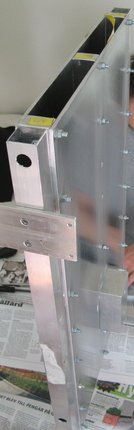
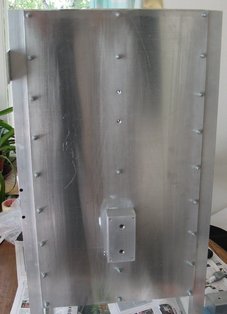
In Figure Two the cooling channel can be seen. It is made of two plates of aluminum, which are separated from each other by three "spacers", also made of aluminum.
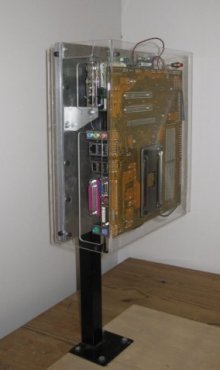
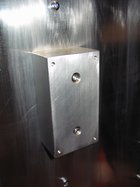
In Figure Three one of the blocks used to transfer the heat to the cooling channel is shown (in the finished product there are two blocks on each side of the channel, in this photo only one of the blocks has been attached to the channel). This block is also made of solid aluminum. Apart from transferring the heat, the aluminum block is used to attach the mainboards to the cooling channel (in fact, the mainboards are only attached to the channel in this way). A closeup of this block is shown in Figure Four.
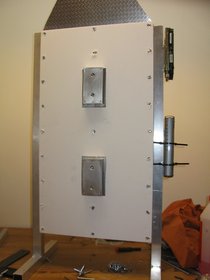
To confine the heat to the interior of the channel the exterior sides can be insulated - as shown in Figure Five. The structure at the top of Figure Five is a "tunnel" used to attach one fan to the cooling channel, however, in the final version this tunnel was not used.
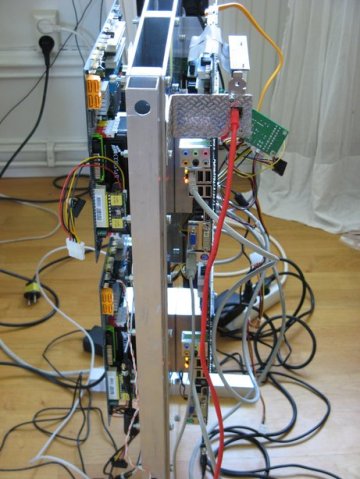
In Figure Six the four mainboards can be seen, also visible here is one extra network interface card (NIC) adapter, attached by a riser card to the master node. This extra NIC is used to connect the cluster to the local LAN, the internal NICs on the mainboards are used for the internal communication between the nodes (as they are desktop components, these mainboards only have one internal NIC each). To this end a standard 8 port (gigabit) switch is used. The switch, the only hard drive on the system and the cover can be seen in Figure Seven. Also in this picture the "power bricks" of the PicoPSU are visible -- attached to a bottom plate of the system.
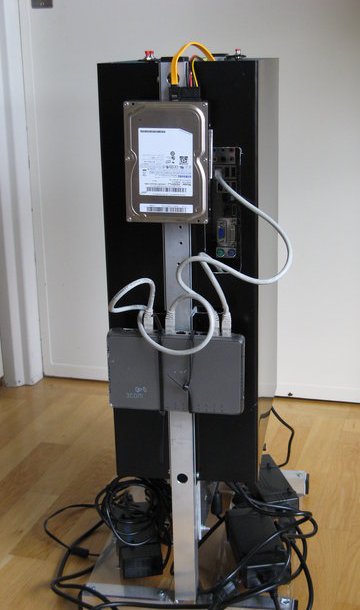
Finally, in Figure Eight the fans used to cool the system are shown. As already mentioned they are silent, 1000 rpm, 12 cm fans, and in an office environment it is hard to hear them.
In all this system worked as expected, although the temperatures were a bit too high to operate it without fans. This was actually a result of a misunderstanding, originally it was supposed to consist of two cooling channels instead of one. However, that would have made the system bigger and as already mentioned the two fans are quite silent. It is also reasonably small, and having only one hard drive using Perceus on top of CentOS. Apart from being small, silent, and cool, it was also inexpensive (we do not include the time we have put into this project). This system was, after some tests, sold to a company having a need for a small cluster (and not having access to a dedicated cluster). They were really surprised by the combination of silent operation and high performance from a system of this size.