
The Supercomputer (SC) show is always a highlight for HPC people. It's a chance to see old friends in the HPC world, to make new ones, and to see what new stuff companies are announcing. This year's show at Tampa was a bit bland in my opinion. There was no real big theme or announcement. Tamp may sound like a great place, but more on that later.
Regardless of the ho hum SC06, there are always a few good nuggets to talk about. In this wrap-up I'll talk about what I saw at the show and what my opinions are. Please feel free to disagree or tell me what you thought was worthwhile. You can also hear Doug and I discuss SC06 and interview the likes of Don Becker and Greg Lindahl on ClusterCast.
Location, Location, Location
In my first blog, I mentioned that Tampa was not the best location for SC06 and I'm sticking to that opinion. Tampa may sound like an ideal spot - lots of sun, near the ocean, Disney World is only an hour away, and good seafood. Well, this is all true and it was warm and sunny most of the time. But it kind of stops there.
The convention center was small. So small in fact that many vendors were restricted in their booth size. Also there were some booths that were moved out into the hallway outside the show floor or in strange locations in the exhibit hall. I'm not exactly sure what possessed the organizing committee to choose Tampa, but I heard a number of vendors grumble about size of the show floor. I just hope that this isn't the first round of an exodus from SC. Don't forget that just a few years ago SC almost died due to lack of attendance and was really just a very small show. I hope that doesn't happen again.
Tampa has plenty of hotels. It's just that most of them weren't near the show. If you were one of the lucky few who got a hotel within walking distance to the convention center you were golden. Otherwise, you ended up staying all over place often 20+ miles from the convention center. The SC06 organizing committee did a good job of providing buses to and from nearby hotels. However, these buses stopped running fairly early so if you wanted to enjoy the nightlife of the Tampa area, you ended up taking a cab. Of course this assumes you could find some nightlife in downtown area.
My favorite nightlife story is from ClusterMonkey's fearless editor - Doug Eadline. Doug and a close compatriot, Walt Ligon, usually have a Cognac and Cigar cluster discussion forum at SC. This year it was highly anticipated because being in Florida, one would assume that you could find good cigars and a place to smoke them. So Doug, being the great planner that he is, found a cigar and bar in a nearby place called Ybor City (note that there was nothing in downtown). Doug is assured that they are open late, 7 days a week. Doug then announces the LECCIBG on ClusterMonkey and the beowulf mailing list ("announce Doug, announce"). So Doug and a band of dedicated cluster monkeys in training then make their way to Ybor City on a Monday evening only to find the Cigar and Bar place closed in addition to the whole of Ybor city.
So enough of Jeff's complaining about the location. At least the convention center had a Starbuck's (and $8 hot dogs). So let's move onto cool things on the show floor.
Tyan's Personal SuperComputer (PSC)
Tyan has been on the warpath to develop and market a personal supercomputer. These systems have been developed and marketed before by companies such as Orion Multisystems and Rocketcalc. However Tyan has differentiated themselves on a number of fronts. First, they developed the hardware and will use partners and VAR's to provide the software and applications. Second, they have listened to potential customers and incorporated many of their requests into their new product (more on what these requests are further down).
Why a Personal Supercomputer?My father is a historian and I remember the historian creed, "Those who don't study history are doomed to repeat it." (OK, this is a paraphrase, but you get the idea). I am a firm believer in this creed and I am convinced it applies to HPC. Prior to the rise of clusters we had large centralized HPC assets that were shared by many users. To run on them you submitted your job to some kind of queuing system and waited until your job ran. Sometimes you got lucky and you job ran quickly. Most of the time you had to wait several (many) days for your job to run. Just imagine if you were developing a code. You compile and test the code with the time between each test being several days. If you were lucky you got your code debugged enough to run in a few months. Over time, the number of users and their job requirements quickly outgrew the increase in speed of the machines. So if you took the performance of the HPC machines and divided by the number of users, the amount of time each user effectively received was very, very small. So, the users were getting an ever decreasing slice of the HPC pie. This is not a good trend. More over, HPC vendors were not thinking outside the box to get more power to the individual but just insisted that people buy more of their expensive hardware.
Thank goodness Tom Sterling and Don Becker (and others) decided to think outside the box and run with the Cluster of Workstations (COW) concept to create the Beowulf concept. Taking advantage of inexpensive commodity hardware (processors, interconnects, hard drives, etc) and free (as in speech) operating systems (such as Linux), they showed the world that it was possible to give HPC class performance on closer to the desktop to HPC users. Thus, they broke the HPC trend of decreasing time per HPC user. In addition, they gave a huge price/performance boost to HPC.
A lot has changed since Tom and Don developed and promoted the Beowulf concept. Clusters are the dominant "life form" in HPC. But if we take a closer look at what people are doing with clusters, we will see that they are just replacing their large centralized HPC assets with large centralized cluster assets. So in my mind and in the mind of many others, the HPC community is just repeating history. That is, the user is getting an ever decreasing slice of time on the large centralized cluster. To counter this, companies are starting to develop and market what can be generally described as personal supercomputers. Their goal is to put more computing power in the hands of the individual user. Tyan is one of these companies.
The Tyan Typhoon
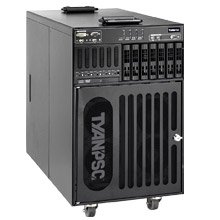
Tyan originally developed a basic small cluster called Typhoon that took 4 motherboards and put them vertically into a small cabinet. It was a nice little box that was fairly quiet, but it was lacking a few things such as a good head node (you couldn't really put a good graphics card on one of the nodes), high performance networking (believe it or not, there are some people who want to run Infiniband on 4 nodes and there are some applications that will take advantage of it). The lack of a good head node has been the Achilles heel of the Orion and Rocketcalc boxes. Tyan has addressed this need with their new systems, the Typhoon T-630 DX and T-650 QX.
The T-630 DX model takes dual-core Intel Woodcrest CPUs and the T-630 QX takes quad-core Intel Clovertown CPUs (see below). These machines are better engineered than the original Typhoon (IMHO). On the top of the cabinet is a dual-socket head node that can handle a real graphics card and storage, and it has 4 dual-socket compute nodes below it mounted vertically. So altogether it has 10 CPU sockets. In the case of Woodcrest chips (T-620 DX), you can have up to 20 cores and in the case of Clovertown (T-630 QX) you can have up to 40 cores. One of the most important features of the Typhoon is that it plugs into a single circuit (1400W max power) so you can safely put it underneath your desk (plus it will keep your feet warm in the winter). Figure 1 is a picture of the Typhoon T-630. Figure 2 is a front view of the Tyan T-630 with some comments about the ports on the front of the system. Figure 3 is a view of the back and the top of the system. In the back view, note the two large exhaust fans for the head node that are at the top of the system and the 3 exhaust fans in the middle of the system for the compute nodes. At the bottom of the rack are the 3 power supplies for the system.
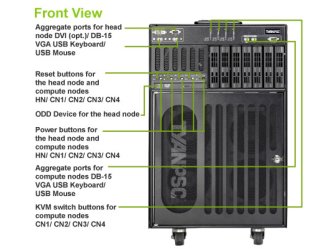
The head node can hold up to 3 SATA II drives that can be used to create storage for the compute nodes using a centralized file system such as NFS, AFS, Lustre, PVFS, etc. Each compute node can also hold a single SATA II drive. With a total of 7 SATA II hard drives you can create a fairly large distributed file system using something such as PVFS or Lustre. Each node also had dual GigE ports or one GigE port and one IB port. The head node also holds a DVD drive and allows you to plug in a keyboard, mouse, and a video out. As I mentioned previously, the head node also has a PCI-Express slot and room for a high-performance video card (beware that video cards can draw huge amounts of power though). Each node, including the head node, is limited to 12 GB of FB-DIMM memory.
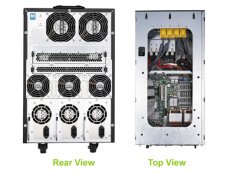
The general chassis has a built-in KVM (Keyboard/Video/Mouse) and a GigE switch for the entire cluster. In the case of Infiniband, it will also hold an IB switch. It also has three 600W power supplies with 3 power cords with one of the power supplies being used just for the head node. Tyan has also designed the box to sequence power to the nodes so you don't get a circuit overload when you start the machine. But it also has individual power switches for each node. The overall chassis is 20.75" high by 14.01" wide and 27.56" deep. So you can easily fit one of these underneath your desk. Plus Tyan is saying that the machine is very quiet (less than 52 dB). Tyan built the machine to last so it's a bit heavy - up to 150 lbs. So I would recommend rolling the machine around on the built-in casters. In Figure 4 below, is a picture I took of T-630 at the show. It was when the show floor was being set up, so it's a bit rough, but you can see the size of the machine relative to the hand working the mouse at the bottom of figure.
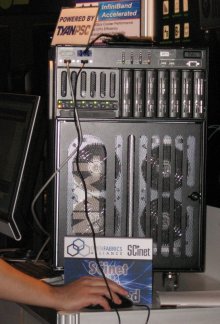
In the picture you can see the 4 large intake fans for the compute nodes that are at the bottom of the unit. You can also see silk-screened "Tyan" logo on the front grill.
The machines are ready to have an OS installed them and are ready to run when you get one (please, Santa, please!). They can run either Linux (pick your flavor and pick your cluster system) as well as Windows CCS. I think Tyan is doing things a bit differently than others as they are providing a really top notch hardware platform and they are letting others focus on the operating system, the cluster tools, and of course the cluster applications. This choice means that Tyan is doing what they do very well - design and build hardware - and they are providing opportunities for other companies to then integrate software on these boxes. This is a great model (IMHO). You can see more on these machines at TyanPSC. Even though it won't do you any good, be sure to tell them that Jeff sent you.
Storage
If I had to pick a theme for SC06, and this is stretching it a bit, it would be "High-Speed Storage." Clusters are becoming a victim of their own success. in that they can generate data at a very, very fast pace. You have to put this data somewhere so you will need lots of storage for it. Plus you will need to keep up with the pace that the data is being generated. Some codes generate prodigious amounts of data at a blazing pace. These needs have created the market for high-speed, large capacity storage. There were a number of vendors displaying high-speed storage at SC06. PanasasPanasas made some significant announcements at SC06. They announced Version 3.0 of their operating environment, ActiveScale. The new version has new predictive self-management capabilities that scans the media and file system and proactively corrects media defects. This feature is very important since commodity SATA drives will soon hit 1 TB in a single drive (for extra credit - how many sectors would be on one of these drives?). This development means that the probability of having some bad sectors increases. So being able to find, isolate, correct and/or mark bad sectors will be a very important problem (actually it is a very important problem, it just hasn't been addressed by many companies). Furthermore, Panasas improved the performance of ActiveScale by a factor of 3 to over 500 MB/s per client and up to 10 GB/s in aggregate.
Pansas also announced two new products - ActiveScale 3000 and ActiveScale 5000. The Activescale 5000 is targeted at mixed cluster (batch) and workstation (interactive) environments that desire a single storage fabric. It can scale to 100 of TBs. The Activescale 3000 is targeted at cluster (batch) environments with the ability to scale to 100 TB in a single rack and combining multiple racks allowing you to scale to Petabytes (Dear Santa, Jeff has been a good boy and would like a Petabyte for Christmas...). Oh and by the way, Panasas won the HPCWire's 2006 Editor's Choice for Best Price/Performance HPC Storage/Technology product.
To me, what is significant is that Panasas is rapidly gaining popularity for high performance storage for Linux clusters. Part of the reasons for the popularity is that Panasas has very good performance while still being a very easy to deploy, manage, and maintain storage system. Plus it is very scalable. In talking with Panasas they showed me how easy it is to deploy their high-speed storage. In fact it was very, very easy.
Scalable Informatics: JackRabbit
The cluster business is a funny one. The smaller companies are the ones doing all of the innovation and make wonderful, reliable systems, but customers are reluctant to buy from them for various reasons. But, I think their ability to innovate and drive the technology is what is driving the industry today. One smaller cluster company in particular, Scalable Informatics, has been doing wonderful innovative work with clusters. Sometimes it's as simple as understanding the hardware and software and being able to integrate them. Then other times it's coming up with a new product that is much better than others. Scalable Informatics has developed a new storage product called "JackRabbit." They can stuff up to 35 TB in a 5U chassis by putting the disks in vertically. This forms the basis of a storage device that has Opteron CPUs and RAID controllers. The really, really cool thing is that they have designed this thing for performance that is really amazing. Using IOZone they are able to get over 1 GB/s sustained performance on random writes for files up to 10 GB in size (i.e. much larger than cache). This performance is about an order of magnitude better than other storage devices excluding solids state devices. Plus, it uses commodity storage drives and commodity parts, keeping the costs down. You can also put just about whatever network connection you want in the box. This is one of the best storage devices I've seen in a while. DEFINITELY worth investigating.
Other Storage VendorsThere were a number of other storage vendors at SC06 that I really didn't get a chance to talk with. For example, Data Direct Networks was there showing their S2A storage technology for clusters. It probably is the highest performing storage hardware available for clusters (excluding solid-state storage). They won HPCWire's 2006 Reader's Choice Award for Best Price/Performance Storage Solution.
CrossWalk was also there demoing their iGrid storage technology. iGrid is a product that sits between the cluster and the storage and gives you one a single view of all of the storage.
Montilio was also at SC06 showing their really cool technology that can improve data performance by a large percentage. Their basic approach is to split the control data flow (metadata operations) from the actual data flow. They have a PCI card that provides this split operation for NFS and CIFS traffic.
Dolphin was also at SC06. For many years Dolphin was know as a switchless cluster interconnect. It's a very cool technology that allows you to connect nodes without switches in certain topologies such as rings, meshes, torus, etc. This technology allows you to expand your cluster without having to add switches. Plus the performance of their network is very good with low latency and a good bandwidth. Lately Dolphin has started to focus on the storage market. Using their networking solution, you an add storage devices without having to add switches. Plus the performance of the network is very good, particularly for storage. At SC06 they talked about using their technology for creating database clusters for something like MySQL. Since clustered databases are on the rise, Dolphin is poised to make an impact on this market. This situation is particularly true for open-source or low cost database products where clustering is starting to take off and where license costs do not increase dramatically with the number of nodes as do commercial database solutions.
One of the coolest products I saw at the show for the performance geek in all of us was the Texas Memory Solid State disk with a built-in IB connection. Texas Memory already builds probably the fastest solid state disk that I know. It can do over 3 GB/s in sustained throughput and 400,000 random I/Os per second (this is fast, trust me). With the new IB connection their RamSan boxes can be attached directly to an IB network. Now we are talking hyperspace! It is expensive, but if you need the fastest IO on the planet, then this is it (I won't bore you with yet another thing that Jeff needs for Christmas).
Rackable Systems
There are many cluster companies that provide cluster hardware, but Rackable Systems has been able to differentiate themselves from the others. Even though HPC is not what I would consider one of their big markets, they have some very interesting products that seem tailored to HPC. They have focused on density and on reducing power consumption. They have a product called "Scale Out Series Servers" that do something really interesting. They pack two servers side by side in the front and back of the rack as show below in Figure 5.
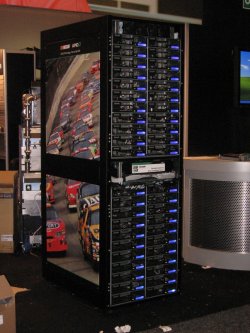
In the picture, you are looking at the front of the rack with each row of the server containing two servers side by side. The back of the rack looks identical to the front. The front and back nodes exhaust into the middle of the rack and then the heat exhausts upwards. So they are taking advantage of heat naturally rising. All access to the nodes is done through the front so you don't have to mess with the back of the nodes. There are a total of 44 nodes on the front and 44 nodes on the back for a total of 88 nodes in a single rack. Each node can have single or dual-socket boards. So, let's play some arithmetic. This means we can have 176 cores if using single cores, 352 cores if using dual-core CPUs, or 704 cores if using quad-cores. That's pretty good density.
Rackable has also focused on reducing the power consumption of clusters by offering a DC power option. Rackable claims that this can reduce the power costs of a rack by up to 30%. They run DC power to the nodes and put the AC-to-DC rectifiers at the top of the rack (they can produce a fair amount of heat so putting them at the top means that less heat will make it to the nodes). So they have taken a big chunk of the thermal load in a normal cluster (power supplies in the nodes) and put it outside of the rack (at the top). Nice thinking.
Intel
Quad-core processors!!! Just in Time for the HolidaysI love competition. For us commodity consumers, it means faster, better, cheaper. For the companies, it means they get to do exciting projects and keep their employees interested (Ever seen a bored engineer? It's not pretty.). For a while, AMD was the king of the mountain with the Opteron series. Now Intel has caught up with their Xeon 5100 (Woodcrest series processor) and in some cases, depending upon the benchmark, have surpassed the Opteron. During SC06, Intel announced their new quad-core processor, the Xeon 5300 (Clovertown). This is the first commodity quad-core processor on the market. But it's actually two Woodcrest (Xeon 5100) processors in the same chip module. While this gets Intel to the vaulted quad-core level first, it may not be the best choice for a quad-core chip.
The Woodcrest (Xeon 5100) is a very interesting chip because it has a large cache (4 MB) that is shared between the two cores. This means that at any point one of the cores could be using the entire cache. It also opens up the possibility of efficient cache-to-cache transfers. The CPU has the ability for up to 4 operations per clock so the theoretical processing power of the chip is quite high. But codes have to be rebuilt to use the increased operations and hopefully a compiler can recognize when to use 4 ops per clock (code may have to be modified to truly use this much processing power). To feed the beast, Intel has pumped up the front-side bus to 1333 MHz. This gives the Woodcrest a very good memory bandwidth, but typically slightly lower than the Opteron. However, the Woodcrest comes at a very nice power level. The top end part (3.0 GHz) is an 80W part and the 2.66 GHz is a 64W part. Of course, these numbers don't include the extra power for the memory controller or the extra power for the FB-DIMMs (they use more power than DDR or DDR2 memory), but overall, the balance of power usage compared to Opteron is fairly close when you are below the top end part (3.0 GHz).
With the Clovertown (Xeon 5300) CPU, Intel has taken two Woodcrest chips and put them together in a single module. The two halves of the module share a 4 MB cache, but you can't share cache across halves (not necessarily a big deal). To keep power within reasonable limits Intel has limited the speed of the fastest part to 2.66 GHz. This chip has a power limit of 120W (a bit high, but not bad for the first quad-core part). The next speed down, 2.33 GHz, has a power limit of 80W (much more reasonable). So if you are using the fastest speed quad-core, be ready for some serious power loads (I've heard that a per node power requirement for a dual-socket, 2.66 GHz quad-core with a hard drive and memory is around 400W). The one thing Intel didn't do and probably couldn't do in the time frame, was raise the front-side bus speed. So the poor quad-core Clovertown has it's memory bandwidth to each core cut in half compared to the Woodcrest. This is likely to limit it's applicability to HPC codes. However, the Clovertown is definitely a "Top500 killer." If you want to be in the Top500 and keep your power, cooling, and footprint to a minimum then look no further than Clovertown.
While I was at the show, I stopped by the Appro booth. While I was chatting with someone (see below):
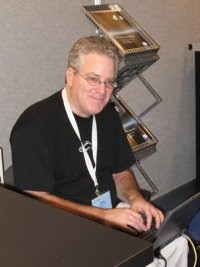
I noticed this really interesting whitepaper from Appro, "MPI Optimization Strategies for Quad-core Intel Xeon Processors." I won't name the author (Doug Eadline), but it's a really great paper that presents some interesting studies of Intel's quad-core processors in Appro's nodes. The highly esteemed author tested a couple of Appro's Hyperblades with the NAS Parallel Benchmarks. He did some testing using Open MPI on two nodes that were connected via Infiniband. I won't spoil the ending of the whitepaper (it's not up on Appro's site yet, but it should be soon), but Doug has some very interesting observations. For example,
- Check your code for memory bandwidth requirements and if there are any memory contention issues try using more cores off-node that than all the core on the node.
- Running a mix of codes on quad-core may lead to a different scheduling strategy because of memory contention.
- Because there are now so many cores per node, you may not be able to efficiently use GigE as an interconnect (but this is code dependent).
Doug has a number of other conclusions which I won't restate here. I will just finish by saying that it's a definite worthwhile read for everyone in clusters.
New Intel Blade Board
One of Doug's observations was that GigE might not be enough for nodes with dual-sockets and quad-cores per socket (8 cores per node for a dual-socket node) because of the NIC contention (all of the cores trying to pump data to the NIC at the same time). If you think about it, this is a very logical consequence of going multi-core. You now have lots of cores trying to push data out on the same NIC within the board. There are three possible solutions to this general problem, (1) Find a better way to get data to the NIC, (2) Add more NICs per board, (3) Reduce the number of sockets or cores per node. The first two solutions seem somewhat obvious (Level5 which is now part of SolarFlare has found a cool approach to efficiently getting data to the NIC). The last approach, reducing the number of sockets or cores per node seems somewhat counterintuitive. But this is what Intel has done.
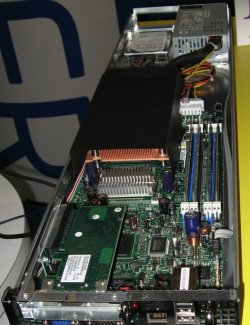
At SC06, there were showing their S3000PT server board. It is a small form factor board (and I do mean small: 5.9" x 13") that has a single socket on board with 4 memory DIMM slots (maximum of 8 GB of memory). It has 2 SATA 3.0 Gbps ports and two Intel GigE ports (did I ever mention that I REALLY like Intel GigE NICs). It also has integrated video as most server boards have. Perhaps more importantly, it also has a PCI-Express x8 slot that allows you to add a high-speed network card. Figure 7 below is a picture that I took at the show of the board.
The board can use Xeon 3000 processors (basically Intel Core 2 Duo chips for servers). The top-end processor (Xeon 3070) runs at 2.66 GHz with a front-side bus of 1066 MHz and contains a 4 MB L2 cache. However, the interesting thing is that the Intel S3000 chipset uses DDR2 memory. This reduces the power load and reduces memory latency (FB-DIMM's have a memory latency that is higher than DDR2 memory).
In Figure 7, you are looking at the front of the board. Under the large black object is the heatsink for the dual-core processor (notice that there is no fan). On the right-hand side you can see the memory DIMM slots (black and blue in color). Then in the bottom left hand side of the picture you can see an Infiniband card in the PCI-e x8 slot (the card is sideways).
You can take these small server boards and create a simple blade rack for them. Intel has done this as shown in Figure 8.
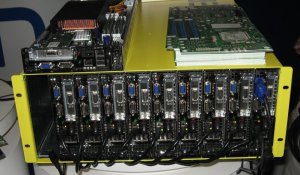
In this chassis, you can get 10 nodes in about a 4U of space (I'm not sure if this is correct). It is a fairly long chassis, but there are power supplies and connectors in the back of the chassis (I'm not sure where the hard drives go in this configuration). You can also see one of the "blades" sitting on top of the chassis and see the Infiniband connector on the left hand side of the blade (it's the silver thing).
The boards use Intel's Active Management Technology (AMT) for managing the nodes. It's an out of band management system that is more designed for the IT Enterprise. There are Linux versions of tools that allow you to get to nodes using AMT. The Intel website says that AMT allows you to manage nodes regardless of their power state and to "heal" nodes (I'm not sure if they can deliver virtual band aids yet, but it sounds interesting). It also says that it can perform monitoring and proactive alerting. I'm curious why they have chosen to go with AMT instead of the more standard IPMI. Perhaps it's an effort to lock people into their hardware. Maybe it's easier to put AMT in there? Who knows?
So Intel has created a small blade server using these S3000PT boards. They are relatively low power boards and have the things that HPC systems need: built-in GigE (two of them), a reasonable amount of memory (8 GB) but more might be necessary in the future, expandability in the form of a PCI-Express x8 slot. While the boards currently use only dual-core CPUs, I wouldn't be surprised to see a quad-core version out in the near future. I think a quad-core version of this board makes a great deal of sense. People have been using GigE with dual-core CPUs and two single-core CPUs for quite sometime with very good success. However as Doug points out in his whitepaper, when you go to quad-core, using GigE needs to be reconsidered. Using only one quad-core socket per GigE NIC makes sense.


